Q1 Fall 2024
Week 1 | August 19th - 23rd | Edit Week 1 - Rotate Days / Change Dates or Style [must be logged in]Welcome to Class!!

- Please turn in your tech portfolio HERE - DUE TODAY
- If you haven't taken the EOC pretest, please do so TODAY
- Cycle over to FREE CODE CAMP
- WAY TO GO! It's FRDAY!!
- Next week we will start lessons and labs 🙌🙌🙌
- Today, and everyday, Write in your "what I did Today" Section of your portfolio the last 5 min in class. Don't forget your artifact!!!!!!
DUE TODAY!!
- Portfolio Share | 25pts
- "What I Did Today" | 25pts page
- Each day's accomplishment + artifact| 5pts each day with
- Create wk1 survey button| SLIDES HERE
- Bio | 25pts
- Submit your portfolio HERE
- THANK YOU!! YOU MADE IT TO FRIDAY! 🙌🙌🙌
Welcome to Class!! - How do you turn your wk 1 survey into an archive?

Welcome to Class!! - Please start in S3 - What types of artifacts should you use in Web Dev/ Help Desk?
- After you have finished your "Week 1 Survey" and Short Bio, Please continue wth FCC
- A few house keeping items. | |
- Thank you for shareing your digital portfolio with lamarchesa@tfsd.org. Mrs LaMarche will be linking your portfolio with our seating chart
- Everyone should have several min to work in RESPONSIVE WEB DESIGN in FCC

EVERYONE!! - please start in the Esports/Robotics Room
- What I did Today Page Creation | SLIDES
- Help Desk - what is expected
WELCOME TO WEB DEVELOPMENT I - As you return to your computer, please start by clicking on the big blue button below to tell me a little bit about yourself.
Once you have submitted your response, you will be sent a receipt with your answers via email. Please make sure you keep this receipt as you will be adding this to your Web Design Portfolio.
While everyone is filling out the DAY 1 form, I will be walking around to make sure everyone is able to sign in to a computer. Please keep in mind I am teaching two different subjects this class period. We will need to work together. Please ask if you have questions. You might consider asking the person next to you if you have a question or you can always use the JUST ASK BUTTON. I am certain if we all work together we can each be get all the questions we have answered!
Upon completion of this form please make an account with freecodecamp.org - log in using your mytfsd.org google account. Jump right in and start working on RESPONSIVE WEB DESIGN Freecodecamp is a way to work at your own pace and ALSO obtain industry certifications recognized by companies such as Google, Microsoft, Apple, Amazon, and more. Why do you think tech companies look for certifications on job applications? Why might you want to include tech certificates on your resume?
Welcome to Class!
Thank you for coming "back to School" If you have ANY questions, please use the JUST ASK button
- THANK YOU SO MUCH for being patient while students are recovering lost passwords for our Google log ins
- All classes are starting RIGHT AWAY with your digital portfolios
- EVERYONE please go to mrslamarche.org
- tomorrow you will have your own class site

Happy Friday!! Early Release!! Quick shareout on Levi's code
- quick discussion on creating YOUR workspace
- try to have your lesson zero code space linked up by the end of today
- Today, as always, write in your "What I Did Today"
Early Release Schedule
- Period 1 | 8:05 – 8:40
- Period 2 | 8:45 – 9:20
- Period 3 | 9:25 – 10:00
- Period 4 | 10:05 – 10:40
- Period 5 | 10:45 – 11:20
- Period 6 | 11:25 – 12:00
- Period 7 | 12:05 – 12:40
- Lunch | 12:40 – 1:10
Welcome to class!! - Please start @ the computers
- Work on Lesson Zero - this includes reviewing vocabulary and new parts of code.
- Please don't just copy and past the content.
- The goal is to be prepared for next week's discussion by having a good understanding of the vocabulary and new parts of code.
- cycle over to FCC as needed
- Today, as always, write in your "What I Did Today"

Welcome to Class! We will be creating LOG INS - Today. Please, no longer use the ESPORTS log in
- Please jump right in and start @ the computers
- continue with FCC and log your progress in your progress log. Week 1 & 2 "What I did Today" progress logs will be due Friday
- Please create your LESSON ZERO page as seen in our example portfolio | Code Lesson Rubric
- Be sure to write in your "What I did today" section of your portfolio. Make sure to include details of your progress and artifacts and evidenc

Welcome to class! -- Please start at the computers! Portfolio Audits in progress
- please create an account with replit - this wil be the tool we use to create our code from zero to hero!
- Please continue with FCC and log your progress in your progress log. for Weeks 1 & 2 "What I did Today" progress logs will be due Friday
- feel free to take a look at LESSON ZERO in our example portfolio | Code Lesson Rubric
- Today, and everyday, be sure to write in your "What I did today" section of your portfolio. Make sure to include details of your progress and artifacts and evidence
- We will create log ins tomorrow!

Welcome to Class! Quick Audit on Portfolios / Creating a new week!
- Are you interested in Robotics? CLICK HERE
- What is FTC | Quick Watch
- Please take a quick moment to review last week, week 1, listed below. It is important to review just to make sure you aren't missing any very important assignments.
- Please conintue to work on FCC the next few days while we audit our digital portfolios to make sure we have EVERYONE's portfolio is linked up on our seating chart & everyone is in good practice of adding daily artifacts. ✅✅
- This week we will also create log-ins
- Today, and everyday, please write in your "What I Did Today" section in your portfolio to share out all the cool things you are working on. Make sure you are linking to a specific step in FCC.

Welcome to Class!! - Please start in the Robotics Room
- Where did the Internet come from?
- Quick introduction to: THE EVOLUTION of the INTERNET
- Start - THE INTERNET IS FOR EVERYONE!
DUE TODAY!
- Lesson Zero
- What I did Today - entries (Due Everyday, actually)
- You should have signifigant progress in FCC - Responsive Web Design
Welcome to Class!
- Today we are going to continue to talk about some new KEY TERMS and demo code on lessonZero
- Once you have complete your lessonZero, including a self reflection, Cycle back to FCC
- Tomorrow, we will start Lab#0. Be sure you have created your Lab page. Our lab pages will include both past practices of internet technologies AND current events.
- Today, and everyday, please write in your "What I Did Today" section in your portfolio to share out all the cool things you have accomplished
Welcome to Class!
- Today we are going to talk about some new KEY TERMS and run demo code on lessonZero
- DEMO CODE
- Cycle back to FCC
- We are also going to create space for our Lab page. Our lab pages will include both past practices of internet technologies AND current events.
- Today, and everyday, please write in your "What I Did Today" section in your portfolio to share out all the cool things you have accomplished

Welcome to Class! - Please start @ the Computers
- Since today is the first day of the week, its time to start your new week, Week 3 in your portfolio.
- Please take a moment to look over the EXMAPLE portfolio.
- Please note: the most recent week is at the top of the page and each week is it's own unique section
- Cycler over to YOUR NEXT STEP! Work on Lesson Zero and if you have time you could cycle over to FCC
- Today, and everyday, please write in your "What I Did Today" section in your portfolio to share out all the cool things you have accomplished

Welcome to Class!!
- Please plan to spend some time working on Lesson .5
- Cylce over to FCC & document your progress in "What I Did Today" section of your portfolio
- Thank you for working independently and quietly while Mrs. LaMarche tends to Intro to IT and IT Help Desk Students
- **REMINDER** No School tomorrow! Enjoy your 3day Weekend!

Welcome to Class!! - please start @ the computers
- Today is an independent workday
- Lab#Zero shoudl be complete, but you may use today to work on LabZero as needed.
- Please work on Lesson .5 ( Create new lesson page, Define Vocab and new parts of code)
- Cycle over to FCC as needed
- Today and everyday, please write in your "What I Did Today" section of your portfolio

Welcome to Class! - Please start in the Robotics Room
- Quick discussion on Lab#0
- Finish watching - THE INTERNET IS FOR EVERYONE!
- Please take a moment to look over the EXMAPLE portfolio. Each day should have at least one artifact but many days you may have more than one artifact.
- Cycle over to FCC as needed. - Responsive Web Design Certificate will be part of your completed EOC portfolio.
- Today, and everyday, please write in your "What I Did Today" section in your portfolio to share out all the cool things you are working on

Welcome to Class! - Please start in the Robotics Room
- Let's try some multi-tasking today!
- On one screen, please continue to watch - THE INTERNET IS FOR EVERYONE!
- On the other screen, since today is the first day of the week, it's time to start your new week, Week 4 in your portfolio.
- Please take a moment to look over the EXMAPLE portfolio. Each day should have at least one artifact but many days you may have more than one artifact.
- Continue to FCC on the 2nd screen as needed.
- Tomorrow we will go over the specific parameters of Lab#0
- Please note: the most recent week is at the top of the page and each week is it's own unique section
- Today, and everyday, please write in your "What I Did Today" section in your portfolio to share out all the cool things you are working on

Welcome to class! - Happy Friday! Please start @ the computers
- Please continue with your Lab#1 section in your portfolio to include an appropriate thumbnail picture.
- Remember to post your submission receipt to your Lab Page
- Continue to Lesson 1
- Feel free to take a lot at Mrs. LaMarche's example code as needed
- Cycle over to FCC
- Today and every day, please write in your "What I Did Today" section of your portfolio
- Thank you for working independently and quietly while Mrs. LaMarche is tending to many side tech quests!

Welcome to Class!! Please start in the Robotics Room
- Quick Presentation - "Who's in Charge of the Internet"
- Create your Lab#1 section in your portfolio to include an appropriate thumbnail picture
- Continue to Lesson 1
- Cycle over to FCC
- Today and every day, please write in your "What I Did Today" section of your portfolio
- Thank you for working independently and quietly while Mrs. LaMarche is tending to Tech Projects

Welcome To Class - Quick code demo and discussion
- Complete less Lesson .5
- Continue to Lesson 1
- Continue with FCC
- Today and every day, please write in your "What I Did Today" section of your portfolio
- Thank you for working independently and quietly while Mrs. LaMarche is tending to Tech Projects

Welcome to Class! Quick Demo - Lesson .5
- Continue with code on Lesson .5
- Demo Code will continue this week
- Continue with FCC
- Today and every day, please write in your "What I Did Today" section of your portfolio

Welcome to Class! - Please start @ in the Esports/Robotics Room
- Since today is the first day of the week, it's time to start your new week, Week 5 in your portfolio.
- Please take a moment to look over the "What I Did Today" section in the example portfolio as needed.
- Please note: the most recent week is at the top of the page and each week is it's own unique section.
- Cycle over to FCC - Responsive Web Design and continue to be intentional in your progress
- Start code on Lesson .5 if you feel you would like to.
- Today, and everyday, please write in your "What I Did Today" section in your portfolio to share out all the cool things you are working on

Welcome to Class! - Please start in the Robotics Room - Quick Demo
- user ID and temerature check - DUE TODAY
- Teambuilding activities OK
- remember to write your WORKPLACE ready skill in your "What I Did today" if you choose to teambuild

Welcome to Class! - What is the difference between a raster and a vector file? What is lesson 2 about?
- Please take a moment to create your workspace for lesson 2
- Continue with lesson2 for Wed/Thur
- Lesson 2 is ALL about creating images
- Image/ RGB / Slides
- Today, and everyday, please write in your "What I Did Today" section of your portfolio

Welcome to Class! - Please start @ the Computers
- Since today is the first day of the week, it's time to start your new week, Week 6 in your portfolio.
- Please take a moment to look over the EXMAPLE portfolio.
- Please note: the most recent week is at the top of the page and each week is it's own unique section.
- Continuing to work on FCC as lesson are compelte
- Today, and everyday, please write in your "What I Did Today" section in your portfolio to share out all the cool things you are working on

Welcome to Class!! - Please start @ the computers
- Happy Friday!
- Teambuilding OK if you are caught up!
- Today, and everyday, please write in your "What I Did Today" section in your portfolio to share out all the cool things you are working on. Please note your workplace ready skill or if you used today as a study period. Both options allow you to manage your time. Please be sure you are managing your time wisely!

Homecoming Assembly Schedule
1st Period 8:05-8:30
2nd Period 8:35-9:00
3rd Period 9:05-9:30
Assembly Release - drum core 9:30
Assembly 9:40-11:10
4th Period 11:15-11:40
Lunch 11:40-12:40 - No One Eats Alone on Practice FB Field
5th Period 12:45-1:10
6th Period 1:15 -1:40
7th Period 1:45 - 2:00
(Please walk your 7th period class out to your
assigned viewing spot for the parade at 2:00 and stay with your class
during the parade)
Parade 2:10-2:50 (Students are free to leave when the parade is over)
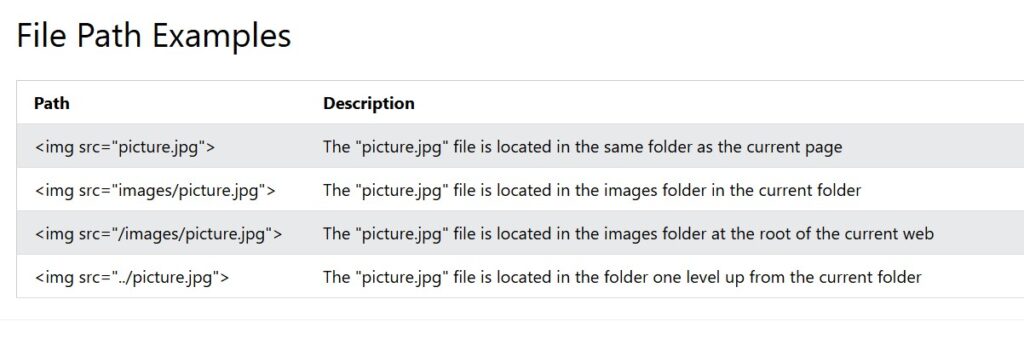
Welcome to Class! Why do we use folders on servers? How do we access their locatoin in the code?
- Quick code demo on Lesson2
- File Folder Demo Types - Demo
- Cycle over to FCC as needed
- Today, and everyday, write in your "What I Did Today" section of your portfolio

Welcome to Class!
- Quick code demo on Lesson2
- Image File Types - Demo
- Cycle over to FCC as needed
- Today, and everyday, write in your "What I Did Today" section of your portfolio

Welcome to Class! - Quick discussion on Lesson 2
- Create your week 7 section in your portfolio
- Finish Lesson 2
- Cycle over to FCC or available projects

Welcome to Class! - Please start @ the computers
- New parts are arriving for Help Desk
- Tue - Thur we will work on Lesson 2.5
- Move onto Lesson 3 as you are able
- EXAMPLE CODE
- Article to Read 1
- Article to Read 2
- **remember** for full points on your EOC you willl need to have completed your RESPONSIVE WEB DESIGN CERTIFICATE, all LABS and all LESSONS
- Today, and everyday, please write in your "What I Did Today" section in your portfolio to share out all the cool things you are working on

Welcome To Class!
- Please start @ the computers
- Roll over Wk8 in your portfolio
- cycle over to FCC
- more labs & lessons this week!

WELCOME TO CLASS! Q1 End GAME - Please start @ the computers
- BEFORE You start your team building Remember, to write in your "What I Did Today" section what "Workplace Ready Skill" you are working on
- Examples of Teambuilding activities
- Work for other classes OK
- ***Mrs. LaMarche will be gone ALL NEXT Week***
- Today, and everyday, be sure to write in your "What I Did Today" section in your portfolio
Early Release Schedule - End of Q1
- Period 1 | 8:05 – 8:40
- Period 2 | 8:45 – 9:20
- Period 3 | 9:25 – 10:00
- Period 4 | 10:05 – 10:40
- Period 5 | 10:45 – 11:20
- Period 6 | 11:25 – 12:00
- Period 7 | 12:05 – 12:40
- Lunch | 12:40 – 1:10
Welcome Back to Class! - Mid Term Meetings
- Over the next few days you will have the opportunity to meet with Mrs. LaMarche 1 on 1 at her desk
- To prepare for this meeting please make a copy and share back a copy of the MID TERM rubric
- Create a "Meetings Page" and nest this page under your about me page
- Embed this rubric into a new page | PLEASE SEE EXAMPLE
- While you are waiting to meet with Mrs. LaMarche, please continue to work on YOUR curent lesson or Free Code Camp
- Today, and everyday, be sure to write in your "What I Did Today" section in your portfolio to account for the amazing things you are able to accomplish

Welcome to Class! - Mid Term Meetings! Dead Week?
- It's Monday! You know the routine
- Please open up your portfolio and create your week 9 entry in the "What I did Today" section of your portfolio
- Be sure to set yourself up with success to include correct dates and bullets for each day in class
- Today, and everyday, be sure to write in your "What I Did Today" section in your portfolio